
Auto-Clean Browser for Faster Performance
Overview
Browser Cleaner is a desktop utility designed to address common performance and privacy issues associated with web browsers, particularly Google Chrome. The software enables users to automatically clean browser data on a daily basis, helping to restore speed and stability. It targets individuals experiencing sluggish browsing, frequent crashes, or slow startup times—common symptoms of accumulated cache, cookies, browsing history, and outdated extension data. The tool is especially useful for users who rely heavily on Chrome for work, research, or daily tasks and want to maintain optimal performance without manual intervention.
Designed as a lightweight, free utility, Browser Cleaner serves both casual users and professionals who prioritize speed and privacy. It allows users to manage extensions, clear sensitive data, and organize bookmarks with minimal effort. Real-world use cases include cleaning up after a day of intensive browsing, preparing a shared computer for another user, or maintaining privacy by removing traces of online activity. The software operates directly within the Chrome ecosystem, making it accessible and practical for users already invested in the browser environment.
Key Features & Capabilities
- Auto-Clean Scheduling – Automatically trigger browser cleanup at user-defined intervals, such as daily, to maintain consistent performance.
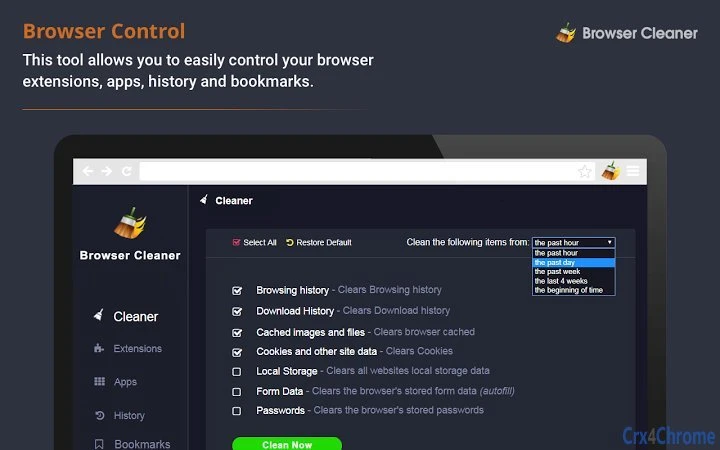
- Comprehensive Data Removal – Clear browsing history, cache, cookies, passwords, form data, download history, and local storage.
- Extension Management – Easily disable, activate, or remove unwanted extensions and apps with a single click.
- Privacy Protection – Erase digital footprints from online activity, reducing the risk of data exposure.
- Smart Dashboard Interface – Access a centralized panel to search, filter, and remove specific history entries, bookmarks, or data types.
- Flexible Time Filters – Choose cleanup scope: past hour, day, week, four weeks, or from the beginning of time.
These features help users reclaim disk space, reduce memory usage, and improve browser responsiveness. For example, scheduling a daily clean can prevent cache buildup that leads to slow page loads. The dashboard enables targeted cleanup, allowing users to preserve essential data while removing unwanted traces. This makes the tool valuable for both personal use and shared devices.
User Interface, Workflow & Performance
The user interface is built around a clean, intuitive dashboard that simplifies access to core functions. Navigation is straightforward, with clearly labeled sections for history, extensions, bookmarks, and data types. Users can initiate a full or selective cleanup with minimal clicks, reducing friction in the workflow. The tool integrates directly into the Chrome environment, ensuring seamless access without requiring complex setup.
Performance details were not specified by the developer. However, given its 2.5 MB size and focus on browser-level tasks, it is expected to operate efficiently with low system overhead. The developer did not provide additional system requirements or resource usage data. Stability is assumed to be consistent with standard browser extensions, but no user reports or benchmark data were made available. General software behavior patterns suggest that automated cleanups should not interfere with ongoing browsing sessions.
Compatibility & System Requirements
Browser Cleaner is compatible with Windows, Mac, and Linux operating systems, making it accessible across major desktop platforms. It is designed to work with Google Chrome, indicating it functions as a browser extension or standalone utility integrated with the Chrome environment. The software has a file size of 2.5 MB, suggesting a lightweight installation that should not strain storage or memory.
Exact system requirements were not listed. The developer did not specify minimum CPU, RAM, or disk space needs. Compatibility information is limited to the supported operating systems and the Chrome browser. Users should ensure their system meets general Chrome requirements for optimal performance, but no specific hardware or software prerequisites were provided.
Pros and Cons
Pros
- Free to use with no hidden costs
- Automated daily cleanup helps maintain consistent performance
- Comprehensive data removal including cache, cookies, and passwords
- Simple, intuitive dashboard for managing browser data
- Supports multiple operating systems: Windows, Mac, and Linux
- Enhances privacy by erasing browsing traces
Cons
- No detailed system requirements provided
- Performance metrics and resource usage were not disclosed
- Limited to Google Chrome, not compatible with other browsers
- Privacy features depend on user configuration and timing
- No official support for offline mode or standalone operation
FAQ Section
Is Browser Cleaner compatible with all browsers?
Browser Cleaner is specifically designed for Google Chrome. It does not support other browsers such as Firefox, Edge, or Safari.
Is the software safe to use?
Yes, the tool is free and designed to manage browser data safely. It does not collect or transmit user data. However, users should ensure they have backups of important passwords or form data before initiating a full cleanup.
How often can I schedule cleanups?
Users can set the auto-clean feature to run daily, with options to clean data from the past hour, day, week, four weeks, or from the beginning of time.
Does Browser Cleaner require an internet connection?
While the software operates within Chrome, it does not require a constant internet connection to function. However, certain features may rely on online components during setup or updates.
Can I use Browser Cleaner offline?
Yes, once installed, the tool can be used without an internet connection. However, updates and some features may require online access.
Final Thoughts
Browser Cleaner delivers a focused, effective solution for users struggling with slow or unstable Chrome performance. Its auto-clean functionality, combined with a user-friendly dashboard, makes it a practical choice for maintaining browser health and protecting privacy. The free pricing model enhances accessibility, and cross-platform support ensures broad usability. While detailed system requirements and performance data are missing, the tool’s lightweight nature and clear purpose make it a reliable option for daily maintenance.
It is ideal for individuals who value speed, privacy, and simplicity in their digital workflow. Whether used personally or on shared devices, Browser Cleaner helps keep Chrome running efficiently with minimal effort. For those seeking a straightforward way to clean up their browser and improve performance, this tool offers a compelling, no-frills solution.
Download Browser Cleaner now







